# Connecting MetaMask to BNB Smart Chain
MetaMask can be downloaded on Chrome and Firefox, or on iOS and Android if you’re a mobile user. For the purposes of this tutorial, we’ll use the Firefox version, but the instructions will be more or less the same for every platform.
Firstly, you’ll want to head over to the MetaMask [Download page](https://metamask.io/download.html). From there, select whichever platform you’re using, and follow the steps to install it on your device. Easy!
Next, follow along with the setup specified by the app. Go ahead and click Create a Wallet. Write down the backup seed phrase somewhere secret (preferably not on an Internet-connected device). Without this phrase, your funds can’t be recovered if your device is damaged or lost. Confirm that you’ve written them down on the next page.
And that’s it! You should now see your wallet, ready to send and receive funds.
*The freshly-initialized MetaMask wallet.*
### Configuring the wallet
You might notice straight away that we’re still dealing with an Ethereum wallet. At best, this won’t work with BNB Smart Chain (BSC) DApps. At worst, **you could lose funds by sending them to addresses you can’t actually use**.
Let’s change that. We want to access the **Settings** to point the wallet towards BNB Smart Chain nodes.
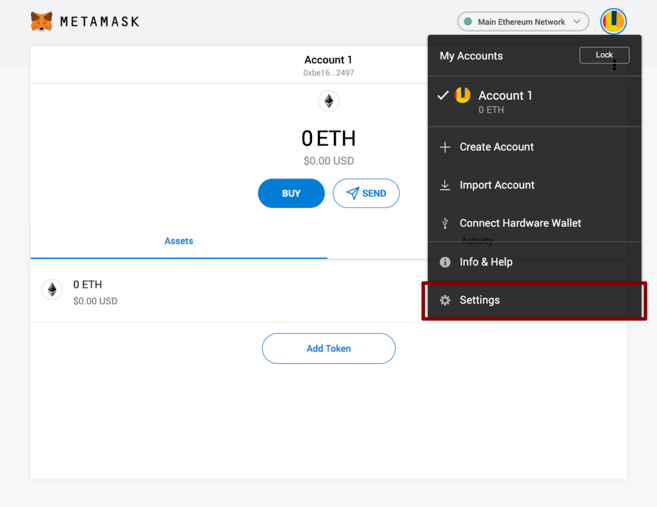
*Select Settings from the dropdown menu.*
On the Settings page, we want to locate the Networks menu.
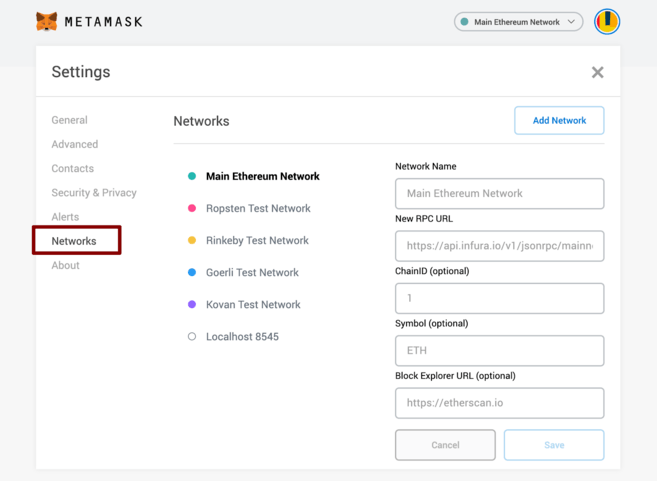
*The Networks menu.*
We want to click **Add Network** in the top-right corner to **manually add the BNB Smart Chain** one – it doesn’t come packaged with MetaMask. It’s important to note that there are two networks we can use here: the testnet or the mainnet. Below are the parameters to fill in for each.
#### Mainnet (This is the one you are probably looking for)
**Network Name:** Smart Chain
**New RPC URL:**
**ChainID:** 56
**Symbol:** BNB
**Block Explorer URL:**
#### Testnet
**Network Name:** Smart Chain - Testnet
**New RPC URL:**
**ChainID:** 97
**Symbol:** BNB
**Block Explorer URL:**
**We’re going to use the testnet in this tutorial**, but you will likely want to use the **mainnet.** We recommend adding both if you intend to use MetaMask to transfer BNB or BNB Smart Chain tokens.
Once you **Save** the Network and return to the main view, you’ll notice two things: the network has automatically been set to the one you just entered, and the units are no longer denominated in ETH, but in BNB.
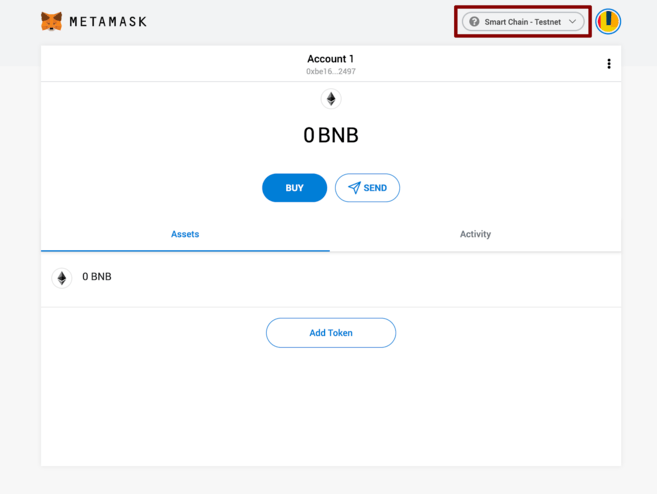
*We’ve connected to the testnet, but you'll probably be connecting to the mainnet.*
### Making transactions (on the testnet)
Don’t let the Ethereum logo fool you – we’ve tuned into the BSC testnet. Next, let’s get some funds to play with. Hover over **Account 1**, and click to copy your address to the clipboard. We’ll head over to the BNB Smart Chain Faucet and paste it into the form.
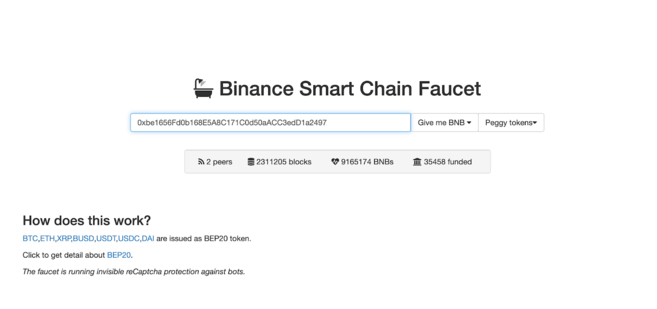
*Let’s get rich.*
Peggy coins might be of interest if you’re testing out an application that supports BEP-20 tokens. They’re simply tokens issued on BNB Smart Chain that are “pegged” to assets on other chains (like BTC, XRP, USDT, etc.), meaning that they trade at the same price.
Let’s stick to BNB for now. Click on the **Give me BNB** dropdown and select the amount you wish to receive. You might need to wait a couple of minutes, but the funds will show up in your testnet wallet imminently.
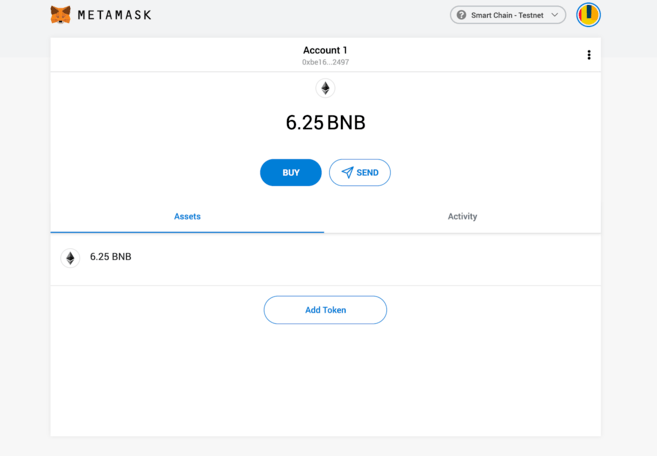
*Our newly-funded wallet.*
From here, we’ll send the funds off somewhere to demonstrate how it works. We’ve just grabbed a random address from BscScan Testnet that we’ll donate them to. Go ahead and click **Send**.
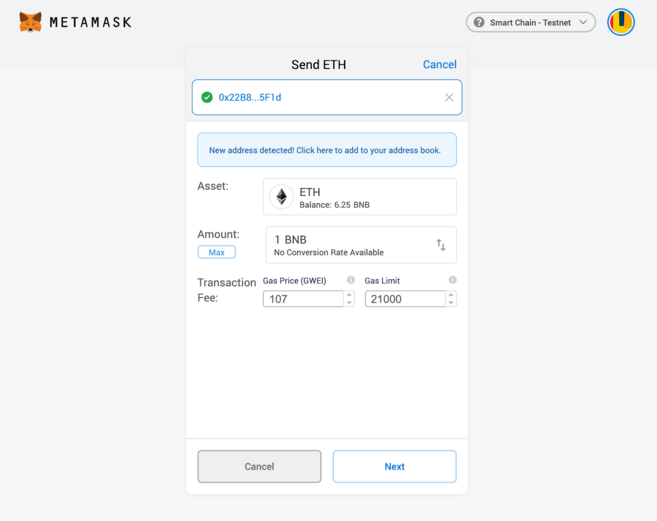
*You can ignore the parts relating to ether. Here, you can manually adjust the fee if required.*
We’ve gone with a transaction of 1 BNB. We’ll leave the fees untouched and hit **Next**. We then get one more chance to review the transaction – if everything looks good, hit **Confirm**. And that’s it! You’ll get a notification informing you when your transaction settles.
###
---
# Agent Instructions: Querying This Documentation
If you need additional information that is not directly available in this page, you can query the documentation dynamically by asking a question.
Perform an HTTP GET request on the current page URL with the `ask` query parameter:
```
GET https://xaix.gitbook.io/x/get-started/wallets-and-networks/connecting-metamask-to-bnb-smart-chain.md?ask=
```
The question should be specific, self-contained, and written in natural language.
The response will contain a direct answer to the question and relevant excerpts and sources from the documentation.
Use this mechanism when the answer is not explicitly present in the current page, you need clarification or additional context, or you want to retrieve related documentation sections.